
The simple answer is that they bring the counter to life and change it from being a simple image to being something interactive.
A Trait is like a behaviour and by assigning traits to a counter the counter can 'do' a lot of things that you would normally do with a counter if you were playing against a real opponent face-to-face.
Probably the best way to explain this is the relatively simple but essential trait called Delete.
When you play a real-life game with physical counter components and a combat result means that the counter is destroyed and removed from play, what do you do? You simply pick it up, remove it from the board, and put it back into the game-box.
Well, how do you do that with a 'virtual' counter? You can't. It isn't physical, there is nothing to pick up! However, you can still 'emulate' what you would do in real-life by assigning the 'Delete Trait' to that counter. This allows you to right-click on the counter and to be given the option to delete the counter from the board. Select the trait and the piece disappears just as if you had picked it up and removed it yourself.
 |
| Here is the South Dakota. The counter at the top is in it's normal state. The counter at the bottom has been right-clicked and displays the option to 'Delete'. You can now click on that option or press CTRL+D and the counter will be removed from play. |
Similarly, in a game, if you wanted to turn your counter to face in another direction you would simply turn it around but how do you do that with a virtual counter? Again, you give the counter a 'Can Rotate' trait which allows you to right-click on the counter, and then click on the trait menu, and rotate the counter - simple.
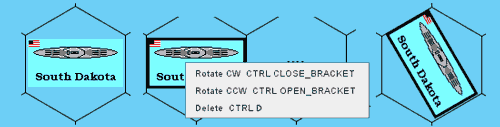 |
| Here is the South Dakota again. On the left is the counter in it's ormal state. In the middle, the counter has been right-clicked and is displaying the Traits menu. Depending on which option you click on (or which keyboard combination you press) the South Dakota can now be rotated clockwise or anti-clockwise as well as being deleted. On the right, the South Dakota has been rotated clockwise 1 hex-face. |
This is why Vassal is superb for playing games on-line. Traits allow you to manipulate the digital-counter as you would a counter in real-life.
However, that is not all that Vassal can do. For instance, let's say that you are playing a real-life game and your counter takes what is known as a step-loss, you would replace the counter with either a weaker counter or 'flip' the counter over to reveal it's weaker side. Again, by using the 'Layer' trait you can do this to counters on the Vassal map-board.
This is of courswe only a very brief introduction to Traits and I will go into them in more detail in later posts.

